Download your files of MARC records for query collections in Collection Manager.
Download a file
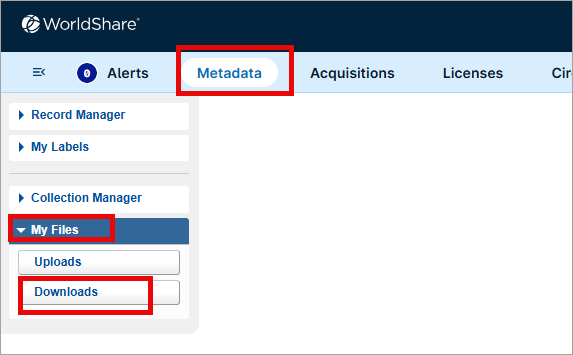
Download your files and records using My Files, located under the Metadata tab in the WorldShare interface. You do not need additional credentials to download records from the WorldShare interface. You also have SFTP options.
See Record output and timing for an output schedule for files of records and timing by collection type.
To download a file using My Files:
- In the WorldShare interface, navigate to Metadata > My Files.
- Click Downloads.
- Locate the file you want to download:
- In the File Name column, find the file you want to download, or
- Use the Filter by drop-down list to limit the results by file type
- Select Hide downloaded files to hide files that have been previously downloaded.
- In the Action column, click Download. The file will automatically download to your workstation.
Watch a video
Download your records in My Files
Run time: 8:26
This video demonstrates where and how to download your files of MARC records, as well as discusses file naming conventions and retentions in My Files.
File size
Files include no more than 100,000 records each. Batches of records that include more than 100,000 records will be split into multiple files with successive files extensions.
File retention
Your files are retained both on the server and in the WorldShare interface for 90 days. You can download a file multiple times.
Note: Collection Manager output files older than 7 days will be compressed (i.e., zipped) in order to improve performance. Compressed files are given the .zip extension but retain their original file name (e.g., metacoll.OCWMS.new.D20170612.T141740.1.mrc becomes metacoll.OCWMS.new.D20170612.T141740.1.mrc.zip).
It is recommended that you process record files in date order. When processing records for a specific date, it is recommended that they are processed in the following order: Deletes, New, Merges, and Updates. See Criteria for new, update, delete, and merged records for more information.
