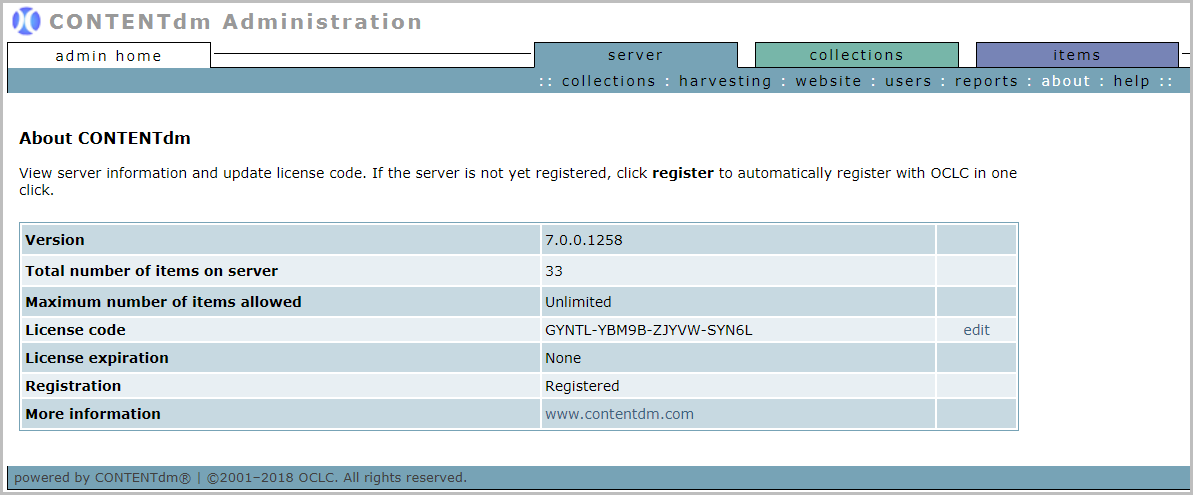
About your site
The About CONTENTdm (classic version) page provides a high-level look at your CONTENTdm (classic version) subscription. Information includes the current version, license and registration information, and the number of items in your repository.
| Server information | Description |
|---|---|
| Version | The version of the CONTENTdm (classic version) you are using. |
| Total number of items on server | The total number of items in all collections in your repository. |
| Maximum number of items allowed | The maximum number of items allowed in your repository based on your subscription level. |
| License code |
The CONTENTdm (classic version) license code. You should not need to modify or update this license code. This license code will be used when installing the Project Client. Anyone can look up the license code on this page and provide it to colleagues who need to install the Project Client. |
| License expiration | The expiration date of the current instance. This will show a specific date only if you have special temporary access to CONTENTdm (classic version). |
| Registration |
The status of your CONTENTdm (classic version) Server registration. CONTENTdm (classic version) instances are always pre-registered. |
| More information | A link to the CONTENTdm (classic version) Website. |
To view About CONTENTdm (classic version):
- Open CONTENTdm (classic version) Administration and select the Server tab.
- Click about.