
Resource Sharing for Groups release notes, October 2026
Release Date: October 19, 2026
Note: References to Patron request forms only apply to libraries using Resource Sharing for Groups with WorldShare ILL or Tipasa.
Introduction
When patrons or staff submit a borrowing request, they can choose an edition preference (Any edition, This edition, or Most recent edition) and can enter edition text (for example, large print). Until now, This edition and Most recent edition did not change which records bibliographic matching could treat as acceptable; matching followed the same rules as for Any edition.
This release makes edition preference functional during bibliographic matching for two enhancements:
- This edition with an OCLC number — When This edition is selected and the request includes an OCLC number, acceptable matches are limited to that OCLC number. The system does not broaden matching using ISBN or ISSN from the request.
- Large print in edition text — When edition text indicates large print (English and non-English phrases), acceptable matches are limited to large-print print-book records in WorldCat, using the same title-matching rules as today when ISBN or ISSN search is involved.
Most recent edition preference is unchanged by this release. It does not add new narrowing behavior.
Libraries on the earlier single-match bibliographic matching path (a small number of institutions) are not affected; behavior for those libraries stays as it is today.
New features and enhancements
This edition matching when an OCLC number is on the request
What's new
When Edition preference is This edition and the request includes an OCLC number, bibliographic matching restricts acceptable matches to that OCLC number only.
- ISBN and ISSN searches are not used to find other acceptable records for that request during bibliographic matching.
- The OCLC number search still runs for that identifier.
- If a match on that OCLC number succeeds, automation can continue as it does today (including applying the matched bibliographic record and continuing toward lender selection, subject to your automation rules).
- If no acceptable match is found on that OCLC number, the request follows the existing no-match path (typically moving the request to Review), with automation history explaining what occurred.
Why this matters
Bibliographic matching is designed to find acceptable WorldCat records so automation can enrich the request and build lender options. When edition preference was informational only, matching used the same rules for every request, whether the patron or staff chose Any edition or This edition. That helped automation find suppliers when identifiers pointed to more than one related record.
This edition means something different: the patron or staff is asking for that catalog record, not a related edition the system might otherwise consider acceptable. That comes up when a researcher needs a specific manifestation, when formats or bindings must not be swapped, or when you create or edit a request in the Staff Interface, keep a particular OCLC number, and send the request to automation because that is the record you want to pursue.
This release adds behavior for that case. When This edition is selected and the submitted request includes an OCLC number, matching respects that choice and does not use ISBN or ISSN to widen acceptable matches. Any edition and other paths keep the matching behavior libraries already rely on.
How it works
Rules use the bibliographic data originally entered on the request (patron or staff citation), including edition preference and OCLC number, before bibliographic matching updates the request.
| Edition preference | OCLC number on the request? | Matching behavior (this release) |
|---|---|---|
| This edition | Ja | Acceptable matches only for that OCLC number; no ISBN/ISSN expansion for acceptable matches |
| This edition | Nee | Unchanged from before this release. Large print in edition text is handled separately (see below). |
| Any edition | Any | Unchanged (unless large print edition text applies; see below) |
| Most recent edition | Any | Unchanged (no new Most recent narrowing in this release) |
| Not specified / blank | Any | Treated like Any edition for these new rules |
What you'll see in Request history
When This edition and an OCLC number apply, automation history will include new helpful entries such as:
- Request for THIS edition only (OCLC number …) — restriction applied.
- Skipped ISSN search due to bibliographic matching restriction — when ISSN search would have run but was skipped.
- Skipped ISBN search due to bibliographic matching restriction — when ISBN search would have run but was skipped.
This new wording appears in Automation history (within Request History) on the request. Messages reflect what happened when that request was processed.
What has not changed
- How patrons and staff select edition preference or enter edition text on forms or in the Staff Interface.
- Most recent edition behavior.
- Matching when This edition is selected without an OCLC number on the request (except when large print edition text triggers the large-print rule below).
Large print matching from edition text
What's new
When edition text on the request indicates large print intent, bibliographic matching restricts acceptable matches to large-print print-book records in WorldCat.
- Detection uses edition text (case-insensitive matching against approved phrases), including common English variants (for example, large print, large type, largeprint) and non-English phrases also indicating large print.
- This applies in addition to existing title, ISBN, ISSN, and OCLC number matching rules. When bibliographic matching searches for matches, results are filtered to large-print print books.
- Large print and This edition with OCLC number are independent. Both can apply on the same request (for example, This edition, an OCLC number, and large print in edition text). When both apply, ISBN and ISSN searches are skipped and the OCLC number result must satisfy the large-print filter.
- If no acceptable large-print match remains after filtering, the request follows the existing no-match path (typically moving the request to Review for staff intervention).
Why this matters
Libraries frequently receive large print requests from their patrons where a regular print copy is not acceptable. Patrons and staff often describe that need in the edition field. Previously, matching could select a non-large-print record that was easier to supply. This release prioritizes large-print records (based on cataloging rules) when edition text expresses that need.
How it works
| Edition text | Edition preference | OCLC number on the request? | Matching behavior (this release) |
|---|---|---|---|
| Large print phrase detected | Any (including This edition) | Nee | Searches that run are filtered to large-print print-book records |
| Large print phrase detected | This edition | Ja | OCLC number restriction and large-print filter on that OCLC record |
| Large print phrase detected | Any | Yes (not This edition) | OCLC / ISBN / ISSN searches run as today, with results filtered to large print |
| No large print phrase | Any | Any | Unchanged (except This edition with OCLC number rule above) |
Large print is a print book concept. Acceptable matches are limited to records WorldCat treats as large-print print books.
What you'll see in Request history
When large print intent applies, automation history will include entries such as:
- Edition preference is large print; automation restricted to large print records — filtering applied.
- Request for THIS edition only (OCLC number …) and for large print format — when both This edition with OCLC and large print intent apply.
If matching cannot find an acceptable large-print record, staff see the existing no-match and Request moved to Review messages, together with the restriction messages above where applicable.
What has not changed
- There is no new large-print checkbox on forms. Staff and patrons continue to use edition text (and edition preference where shown).
- Most recent edition is still informational only and does not narrow acceptable matches.
Transparency in automation history
Bibliographic matching already writes Automation history on borrowing requests. This release adds and clarifies messages so staff can see when This edition or large print rules restricted matching or caused ISBN or ISSN search to be skipped.
Staff should use Request history on the request detail view to review these notes when a request lands in Review or when staff question which record automation considered acceptable.
Screenshots: Automation history
This example shows a request for a large print item. Automation history shows that Automated Request Manager restricted matching records to those cataloged as large print.

This example shows a request for This edition only where the patron also requested large print. Since the OCLC number used in the request is not large print, Automated Request Manager moved the request to Review so staff could decide how to process it.

Where patrons and staff set edition preference and edition text
This release does not create new fields or change labels. Matching uses edition preference and edition text from the request as submitted (or as pre-filled from OpenURL or similar sources). The features in this release use existing fields available on request forms today. Library staff may choose to add them to their forms (Edition and Edition (text)).
Patron request forms
On patron interlibrary loan forms for Resource Sharing for Groups, two optional workform fields supply edition information when your library includes them:
| On the patron request form | Workform field name | Section in Patron Request Workforms |
|---|---|---|
| Edition preference — Radio buttons: Any edition, This edition, Most recent edition | Edition | Patron section fields |
|
Edition text — Free-text box for edition notes (for example, wording patrons use for large print) Note: this field can be pre-populated via OpenURL with bibliographic data from the requested item, but patrons can also overwrite it if desired. |
Edition (text) | Bibliographic section fields |
Your library's patron request forms may already include one or both of these fields. You can add them to your forms if desired.
This release does not change how you configure workforms. For field definitions and editing steps, see Patron Request Workforms (Resource Sharing for Groups) (Patron section fields, Bibliographic section fields).
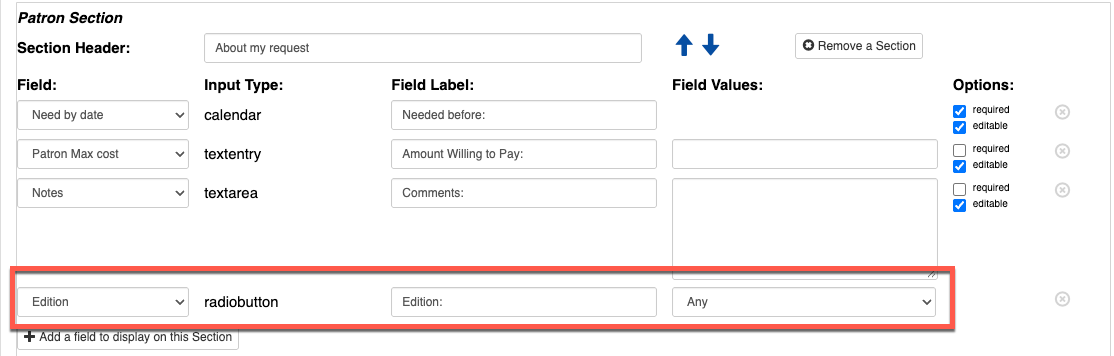
Here is the configuration screen for the patron request form. You can add the Edition field (the Any/This/Most Recent radio button) in the Patron section.
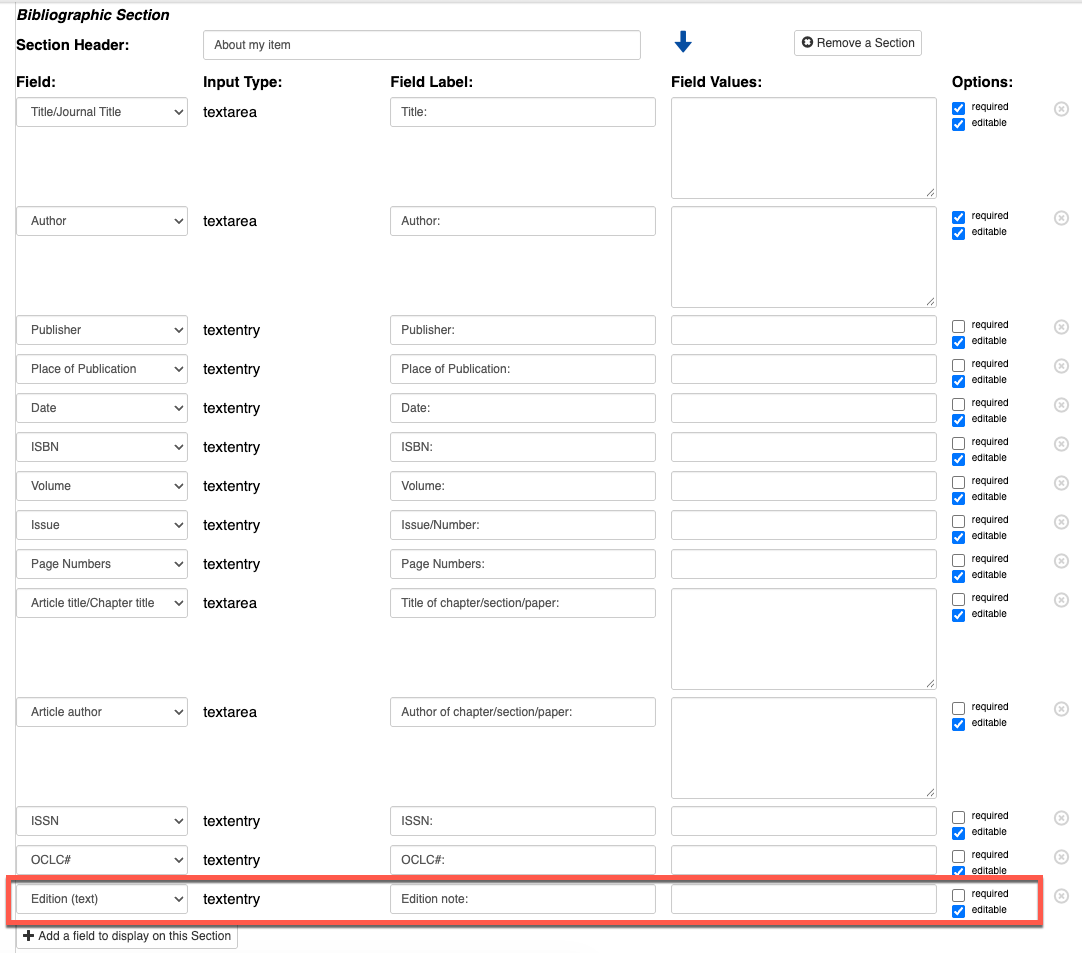
The Edition (text) field can be added in the Bibliographic section. You can edit the field labels if you want to use this mostly for Large print requesting (e.g., "Enter 'Large print' if required.") We suggest making this field editable, but not required (which will be the default configuration when you add it to your request form).
Here is an example of how it looks once you change the Field Label for Edition (text).

Once you have reconfigured your patron request forms as desired, these fields will display to patrons when using these forms (either when typing into a blank form or when requesting items via your discovery system and using OpenURL).

Staff Interface
When staff create or edit a borrowing request (including from Discover Items or a blank create-request workflow), the bibliographic area includes edition preference and edition text for every library. No Service Configuration is required for staff to see these controls.
- Edition preference — Any edition, This edition, or Most recent edition
- Edition — Free-text edition notes (including large print wording)
- OCLC number — When This edition is selected and an OCLC number is on the request, the new matching rule applies after the request is sent to borrowing automation
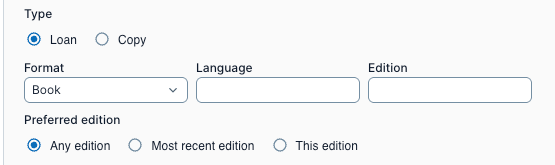
Here is where the edition fields are in the Staff Interface on a borrowing request. Edition may also be populated with text from the bibliographic record in WorldCat.
Recommended actions
For this release, we recommend that you review the following checklists and complete the relevant tasks so that you can adjust your policies and workflows and train your staff. These checklists identify updates that we have determined as significant for most institutions. We encourage you to review all of the items in the release notes to determine whether there are other items that might require additional action or follow up by your institution.
Administrative actions
These items require immediate action or decisions.
| Action |
|---|
| For best performance, clear your browser's cache before starting to work with Resource Sharing for Groups. |
| Understand whether your library uses borrowing automation that builds a smart lender string or sends to lenders. These enhancements affect automated matching, not manual staff-only request creation unless you send the request to automation. |
Follow-up actions
In an effort to keep your staff informed of new features and changes, you may also want to consider these items.
| Action |
|---|
| Share these release notes with your colleagues. Visit the OCLC Community Center to connect with OCLC and other community members. |
| Brief borrowing staff who work Review queues and automation that This edition and large print now change which WorldCat records are acceptable during matching. |
| Show staff where to read Request history and Automation history on a request for new notes related to edition matching or large print requesting. |
| Remind staff that This edition with an OCLC number means the system trusts that record and will not substitute a different or additional edition via ISBN or ISSN. |
| Remind staff that edition preference (Any edition, This edition, Most recent edition) and Edition text are on every borrowing request in the Staff Interface when they create or edit a request. Patrons see the same information only when your Patron Request Workforms include the Edition and Edition (text) fields. |
| If you use patron request workforms, note which forms include Edition and Edition (text) (see Where patrons and staff set edition preference and edition text and Patron Request Workforms help). |
| Train staff who mediate requests or use Discover Items to set edition preference and Edition text on the Staff Interface request before Send to Automation, especially for This edition with an OCLC number or large-print wording in edition text. |
What has not changed (summary)
| Area | Behavior |
|---|---|
| Most recent edition | No new narrowing; same as before this release |
| Any edition / blank preference | Same as before, except when edition text triggers large print filtering |
| Edition preference on forms | Same fields and labels; only matching behavior changes |
| Earlier single-match bibliographic matching | Unchanged for the small number of libraries still on that path |
| Lending-side automation | Unchanged |
| Manual request entry | Unchanged unless you send the request manually to automation with Send to Automation in the Staff Interface |
Best practices
Matching uses values on the original request. Staff can set or correct edition preference, edition text, and OCLC number when creating or editing a request in the Resource Sharing for Groups staff interface, before Send to Automation.
Match the request to what the user needs
| If the patron or staff need… | Suggested approach |
|---|---|
| A specific WorldCat record (same manifestation, binding, or format) | Select This edition and enter the OCLC number for that record on the request before automation runs. |
| A large-print copy only | Enter clear large-print wording in edition text (for example, large print or large type). Use Any edition unless they also require a specific OCLC number. |
| A specific large-print record | Select This edition, enter the OCLC number, and include large-print wording in edition text. Matching applies both rules to that OCLC number. |
| The best chance of supply when any related edition is acceptable | Leave Any edition. Do not select This edition with an OCLC number unless that exact record is required. |
Review queues and automation history
- When a request lands in Review after a patron submits it or after staff send it to Automation, open Request history and read Automation history for messages about This edition, skipped ISBN or ISSN search, or large-print filtering.
- If staff change edition preference or edition text after a request was processed by automation, confirm whether your workflow sends the request to automation again so matching can use the updated values. We suggest you route to automation after making changes to take advantage of this new feature.
Patron workforms and matching
Matching uses edition preference and edition text only when those values are on the submitted request. Patron workform layout determines what patrons can enter on self-service forms.
- When the Edition field is on the workform (Patron section), requests can include Any edition, This edition, or Most recent edition
- When Edition is not on the workform, patrons cannot set edition preference on that form; staff can still set edition preference, OCLC number, and edition text in the Staff Interface.
- When Edition (text) is on the workform (Bibliographic section), text patrons enter is available for large-print phrase detection during matching.
- When Edition (text) is not on the workform, edition text is not collected from patrons on that form (staff entries can still carry edition text).
- Large-print detection matches phrases in edition text (for example, large print, large type), not yes/no answers. Field labels are configurable in Service Configuration; see Patron Request Workforms help for Edition (text) and Edition.
Important links
Support website(s)
Support information for this product and related products can be found at: