
Shared Print retention insights
Overview
Discover an introduction to the Choreo Insights Shared Print insights learning path and this guide.
With Choreo Insights, you can explore Shared Print retentions across all WorldCat, by individual Shared Print programs, or at your own institution. Some common uses for exploring Shared Print retentions and programs with Choreo Insights:
- Compare your collection to others in your Shared Print program to drive collaboration
- Find gaps and overlaps in your program’s retention commitments
- Find titles with few or no retention commitments, so you can decide what to commit to keep
- Find titles retained by others so you can weed with confidence
For more information on the Shared Print Registration service, see Shared Print.
How to use this guide
This interactive learning path allows you to:
- Navigate linearly: Work through each section in order using the sidebar navigation
- Jump to specific topics: Click any section in the sidebar to go directly to that content
- Expand/collapse sections: Use the buttons at the top to expand or collapse all sections at once
- Search within the page: Use Ctrl+F (or Cmd+F on Mac) to find specific information
- Track your progress: The progress indicator shows how many sections you've viewed
About Shared Print
Learn general information about OCLC's Shared Print service.
Shared Print is a registration service that helps libraries and shared print programs record and manage print retention commitments - i.e., the formal statement that a library (or group of libraries) will retain specific print titles/holdings - and make those commitments visible in WorldCat for other libraries and archiving programs to see.
OCLC’s Shared Print Registration service is designed to streamline registering shared print group retention commitments by letting institutions submit data that OCLC then applies as retention statements in Local Holdings Records (LHRs) - creating or replacing LHRs as needed. Once registered, shared print commitments can be discovered in multiple OCLC interfaces and services, including Choreo Insights.
For more information on the Shared Print Registration service, see Shared Print.
My Library's Shared Print Retentions filter
Learn about the options available as part of the My Library's Shared Print Retentions filter in the Insights Builder.
The My Library's Shared Print Retentions filter is available when building a query in the Insights Builder. You can use it to filter by Shared Print programs and retentions in WorldCat. With this functionality, you can explore shared print retentions set against all of WorldCat, as well as against specific shared print programs.
The default option for the Shared Print Count is No Restrictions, which means the filter is not in use.
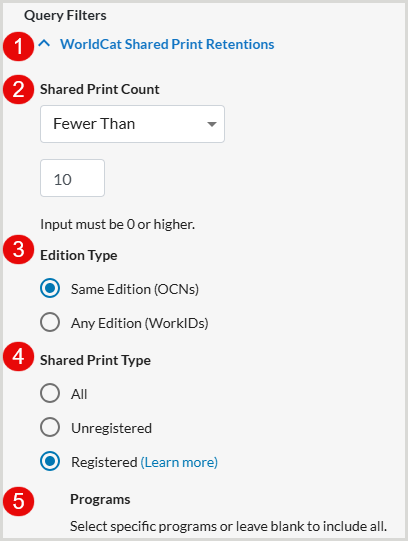
- The My Library's Shared Print Retentions filter is available under Query Filters in the left-hand menu in the Insights Builder.
- To enable the filter, you must use the drop-down to select one of the following Shared Print Count operators:
- Fewer than
- Equal to
- More than
- Between
Note: The More than and Fewer than operators work as true greater than or less than operators, not greater than or equal to or less than or equal to operators. Example: To filter by any OCLC number that has at least 1 Shared Print retention, set the Shared Print Count to More Than 0.
- The Edition Type radio buttons allow you to choose how you would like to limit the query:
- Same Edition (OCNs) (default) - WorldCat holdings count measures the number of libraries in WorldCat holding the same edition, as defined by a specific OCLC number.
- Any Edition (WorkIDs) - WorldCat holdings count consists of the number of libraries in WorldCat holding the same work as defined by the OCLC Work ID.
- The Shared Print Type radio buttons allow you to choose what kind of retentions you would like to view:
- All (default)
- Unregistered - Only shows OCLC numbers that have a committed to retain statement on them
- Registered - Shared Print retention commitments made under one of the listed registered OCLC Shared Print programs
- If you select Registered for Shared Print type, you can then further limit your query to a certain program(s).
View titles not retained in a Shared Print program
Discover how to use the My Library's Shared Print Retentions filter to explore the titles your collection owns that are not retained in a Shared Print program.
Explore titles retained in your collection
Discover how to use the WorldShare Shared Print Retentions filter in Choreo Insights to explore the Shared Print titles your collection retains.
Run an export
Learn how to export the data produced by a Shared Print query using the Export Wizard in Choreo Insights.
Shared Print export fields
Find a list of export fields specific to Shared Print.
The following fields pertain specifically to exported data about Shared Print:
- WorldCat Shared Print Registered Libraries
- WorldCat Shared Print Registered Programs
Note: Deselected by default.
- Local Retention Libraries
Note: Deselected by default.
Next steps
Discover the next steps your institution can take after learning about your collection's Shared Print standing.